AI can help a YouTube creator move faster, but it can also make a channel look interchangeable. That is the quality problem Google and AdSense both care about: a page, video, or tool should add something original instead of repeating what already exists. The useful question is not "which AI tool is best?" It is "where can AI remove production friction while the creator still supplies judgment, experience, examples, and taste?"
This workflow treats AI as a production assistant. It helps collect questions, structure drafts, compare hooks, clean transcripts, and summarize public data. The creator still decides what is true, what is useful, what is visually shown, and what audience problem the video solves.
Where AI Actually Helps
The strongest AI use cases sit before and after recording. Before recording, AI can turn a vague topic into a research checklist, find missing beginner questions, generate outline options, and organize examples. After recording, AI can turn transcripts into chapters, social clips, descriptions, and follow-up ideas. The weakest use case is fully automated publishing: script, voice, footage, and thumbnail created without a clear human point of view.
| Workflow stage | Good AI use | Human decision |
|---|
| Research | Cluster viewer questions and competing titles | Pick the angle only you can explain well |
| Scripting | Draft structure, objections, examples, transitions | Rewrite with your experience and proof |
| Editing | Transcript cleanup, chapter suggestions, clip candidates | Choose pacing, story, emotion, and cuts |
| Thumbnail | Generate layout variations and contrast ideas | Select the promise that matches the video |
| Analytics | Summarize public patterns across uploads | Decide what to test next |
A Research Workflow That Avoids Generic Videos
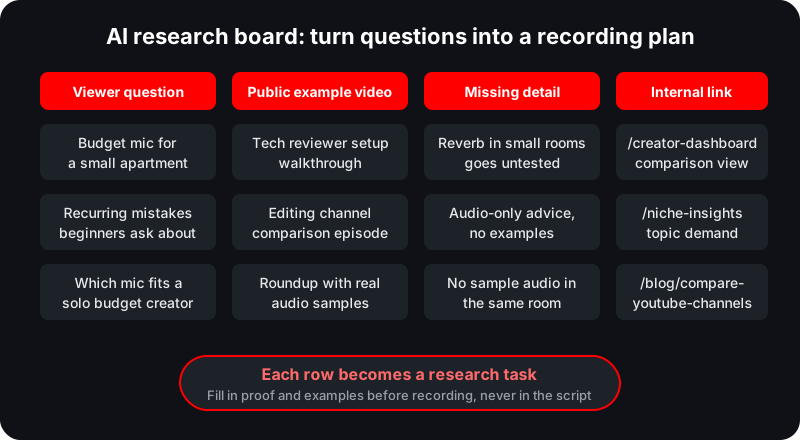
Start with the audience problem, not the tool. If the video is about "best cameras for YouTube," collect real constraints: budget, room size, low light, autofocus, audio, and whether the creator films talking-head, product demos, or outdoor content. Then use AI to turn those constraints into research questions.
For example, a tech channel might compare public videos from Marques Brownlee, Think Media, and smaller camera-review channels. The lesson is not to copy their titles. The lesson is to see what each format explains well and what is still missing for a specific viewer, such as a beginner filming in a small apartment.
Scriptwriting: Use AI for Structure, Not Substance
A strong YouTube script has a clear promise, fast context, specific examples, and a payoff. AI can propose outlines, but the first draft is usually too smooth. Smooth is not the same as useful. Add moments only a real creator would know: what failed, what surprised you, what the viewer should ignore, and where popular advice is incomplete.
A practical prompt is: "Create three outlines for this viewer problem. For each section, list what proof or example I need before I record." That forces the output to become a research plan instead of a generic essay.
Thumbnail and Title Testing
AI image tools can create rough thumbnail concepts, but they should not replace truthfulness. A good thumbnail makes the video's actual promise visible. Use AI to test contrast, facial expression, object placement, and readable wording, then build the final thumbnail with assets you have rights to use.
Before publishing, compare titles against the video promise. "I tested 7 AI editors for YouTube" is stronger than "Best AI editing tools" when the video includes a real test. "Which AI editor saved the most time?" is stronger if the video includes a measured workflow.
Analytics and Public Channel Review
AI is useful for summarizing patterns in a channel's public uploads, especially when paired with the Creator Dashboard. Review recent uploads, view distribution, title length, topic clusters, and repeatable formats. Then ask AI to summarize hypotheses, not conclusions. Public data cannot see retention, impressions, or actual revenue.
Example: AI-assisted channel audit
If a creator sees that tutorials with "beginner setup" titles outperform news reactions, AI can help list adjacent beginner topics. The creator should still validate demand with public search results and Niche Insights before changing the whole strategy.
Quality Control Checklist
- Does the video include original examples, testing, or lived experience?
- Can viewers verify the advice from what is shown on screen?
- Are claims sourced when they involve policies, prices, or revenue?
- Does the script answer a specific viewer problem instead of a broad keyword?
- Would the video still be useful if the AI-generated wording were removed?
Common Mistakes
The biggest mistake is publishing AI summaries of public information without adding interpretation. The second is using AI to chase trends that do not fit the channel. The third is over-automating voice and visuals until viewers cannot tell who made the video or why they should trust it.
Creators who use AI well become more specific. They publish better examples, clearer comparisons, faster edits, and more useful follow-ups. Creators who use AI poorly become more generic.
Audit the public signals before choosing a topic
Use Creator Dashboard to review recent uploads, top videos, engagement, and repeatable patterns before building your next AI-assisted content batch.
Open Creator DashboardFrequently Asked Questions
Should YouTube creators use AI to write full scripts?
AI can draft structure, but full scripts should be rewritten with original examples, accurate claims, and the creator's own judgment.
Can AI content be monetized on YouTube?
YouTube reviews channels against its monetization policies. Originality, value, and policy compliance matter more than whether a tool helped produce the content.
What is the safest AI workflow for creators?
Use AI for research organization, outline options, transcript cleanup, and quality checks while keeping human testing, examples, and final editorial control.
Sources and Methodology
This guide combines public YouTube Data API signals, Norlytics tool methodology, manual review patterns used by creators and sponsors, and official YouTube or Google policy documentation where rules are involved.
Related Norlytics resources
 Norlytics