Sponsorships can earn more than AdSense, but they also carry more responsibility. A good sponsorship fits the audience, is clearly disclosed, and gives the brand measurable value without damaging creator trust. A weak sponsorship can underpay the creator, disappoint the sponsor, and confuse viewers.
This guide focuses on public-data evaluation because brands and agencies often review channels before they have access to private analytics. Creators should still use YouTube Studio when negotiating, but public signals help both sides start from a more informed baseline.
What Brands Actually Buy
Brands are not only buying views. They are buying trusted attention from a specific audience. A channel with 30,000 views from software founders may be more valuable to a SaaS sponsor than a channel with 300,000 broad entertainment views. Audience intent, trust, niche fit, and integration quality matter.
| Signal | Why it matters | How to check publicly |
|---|
| Recent median views | Predictable delivery | Review last 10 to 20 uploads |
| Audience fit | Conversion potential | Topic, comments, language, examples |
| Engagement quality | Trust and attention | Specific comments, questions, repeat viewers |
| Brand safety | Reputation risk | Content tone, controversy, policy fit |
| Integration style | Viewer acceptance | Past sponsor reads and comment response |
Pricing Sponsorships
There is no universal rate. Pricing depends on average views, niche, deliverable type, exclusivity, usage rights, production effort, and whether the sponsorship includes Shorts, community posts, pinned comments, email, or cross-platform assets. A 60-second integrated mention in a high-trust tutorial can be worth more than a brief pre-roll in a broad video.
Creators should build a floor price from time, production cost, and opportunity cost. Then adjust upward for audience value and sponsor requirements. Brands should compare channels by recent median views and audience fit, not total subscribers.
Real Example Patterns
Software sponsors often fit channels that teach workflows, coding, AI tools, productivity, or business systems. Creator education channels such as Think Media may attract camera, editing, and creator-tool sponsors because viewers are actively buying equipment or software. A finance education channel may require stricter accuracy and disclosure because viewer decisions can involve money.
Deliverables to Define
- Video type, length, and placement of sponsor segment.
- Approval process and number of revisions.
- Link placement, pinned comment, description copy, and tracking codes.
- Usage rights for clips, ads, whitelisting, and duration.
- Exclusivity category and time period.
- Payment schedule and cancellation terms.
Red Flags
Creators should be careful when a brand requests broad usage rights without paying for them, asks for undisclosed promotion, demands unrealistic guarantees, or pushes claims the creator cannot verify. Brands should be careful when a channel has volatile views, unrelated sponsor history, low comment quality, or a mismatch between the audience and product.
Use Public Data Before Negotiating
The Creator Dashboard can help estimate recent channel consistency and identify top videos. The engagement rate guide explains how to interpret likes and comments without overvaluing vanity metrics. Combine that with private screenshots from YouTube Studio when a deal becomes serious.
A Simple Sponsorship Score
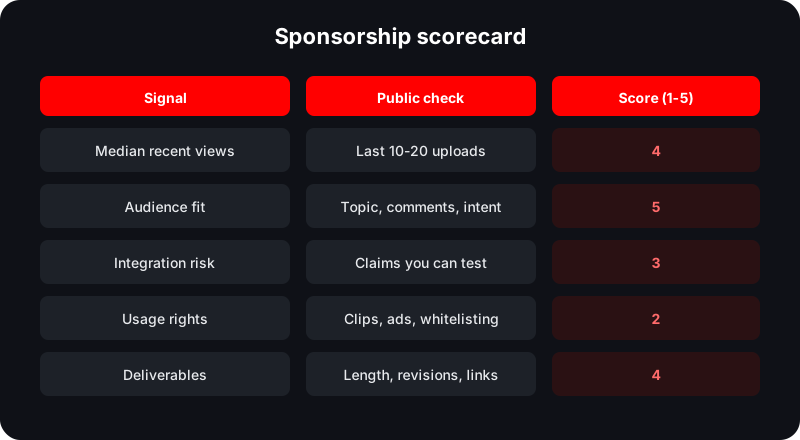
Before quoting a price, score the deal from 1 to 5 across audience fit, product trust, integration effort, brand risk, and usage rights. A deal with strong audience fit but heavy usage rights should cost more than a simple in-video mention. A deal with weak product fit should often be declined even if the payment looks attractive, because trust is the channel's real asset.
| Score area | Low score | High score |
|---|
| Audience fit | Broad or unrelated product | Solves a known viewer problem |
| Trust | Claims are hard to verify | Creator can test and explain honestly |
| Effort | Complex production unpaid | Scope matches compensation |
| Rights | Unlimited usage requested | Clear time-limited permissions |
Protecting Viewer Trust
The best sponsorships feel like a relevant recommendation inside a useful video. The weakest ones interrupt the viewer with a product the creator would never use. Creators should ask for product access before recording, reject claims they cannot support, and make the disclosure clear. Brands benefit too: honest integrations usually create better long-term performance than forced scripts.
Negotiation Checklist
Before signing, write the deal in plain language: what video, what message, what approval deadline, what payment date, what link, what rights, and what happens if the brand misses feedback windows. This protects both sides. It also prevents scope creep, where a simple integration quietly becomes a full ad campaign with extra edits, extra usage, and no extra fee.
Creators should keep a record of public performance after the campaign: views after 7 and 30 days, click data if available, audience comments, and any learnings for the next sponsor. Brands should share conversion results when possible. Better post-campaign data leads to fairer renewal pricing.
Build a sponsorship baseline
Use public channel analytics to compare recent performance before pitching, pricing, or buying a sponsorship.
Review a ChannelFrequently Asked Questions
How much should a YouTube sponsorship cost?
There is no universal price. Start with recent median views, niche value, deliverables, usage rights, production effort, and exclusivity.
Should brands use subscribers to price deals?
Subscribers are less useful than recent median views, audience fit, engagement quality, and integration style.
Do creators need to disclose sponsorships?
Yes. Creators should follow applicable advertising disclosure rules and YouTube policies for paid promotion.
Sources and Methodology
This guide combines public YouTube Data API signals, Norlytics tool methodology, manual review patterns used by creators and sponsors, and official YouTube or Google policy documentation where rules are involved.
Related Norlytics resources
 Norlytics