Few creator questions are searched more often than "best time to post," and few are answered with more confidence by people who have never met your audience. The real answer depends on a handful of messy variables: the habits your viewers already have, the timezone they happen to live in, and the video format you are publishing. A slot built for a 9-to-5 software audience rarely survives contact with global gaming viewers who watch after school lets out.
The useful version of the question is not "what hour should I schedule?" but "what cadence can I hold, and how do I test timing like any other variable?" This guide separates what public data can and cannot tell you.
Why 'Best Time' Lists Are Usually Misleading
Generic lists promising "3 PM on Thursdays" ignore the factors that actually decide whether a video takes off: the search intent of the topic, whether the audience is still awake in your timezone, the browse habits of your subscribers, and how the platform treats new uploads differently across regions. A single universal slot cannot account for all of that.
What Public Upload Data Actually Shows
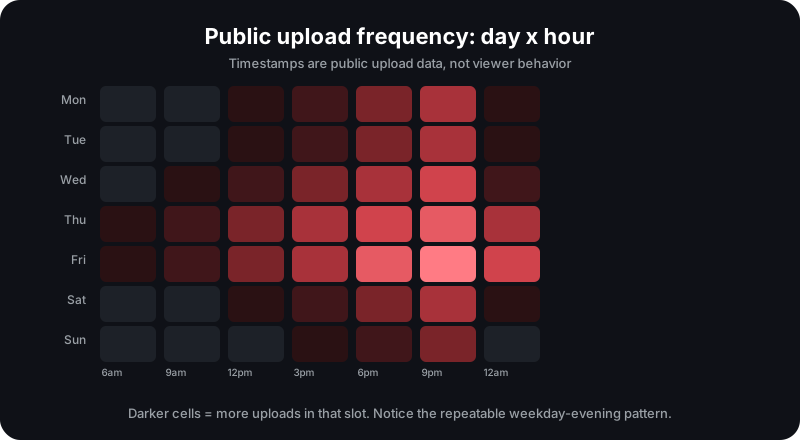
Norlytics reads public upload timestamps, so it can show the days and hours a channel already uses, its average upload gap, and how consistently it publishes. That is genuinely useful for two things: matching the rhythm of channels that succeed in your niche, and spotting channels that publish on a reliable schedule versus those that post erratically.
Cadence Is the Real Lever
For most channels, a consistent schedule beats a perfectly timed one. A channel that publishes one good video per week for six months will outpace a channel that publishes five videos in one burst and then disappears for a month. Cadence also lets you run more experiments, so you learn what your audience responds to faster.
Average upload gap is a public, checkable number. If a competitor maintains a steady weekly gap, viewers learn to expect them, and the algorithm has a regular signal of active publishing. You can compare your own gap against theirs on the Creator Dashboard.
Days and Hours: How to Test
If you want to find the right slot for your audience, test one variable at a time.
- Pick two similar videos with comparable topics and packaging.
- Publish one on your current slot and one on a different weekday or hour.
- Compare first-day views, click-through, and average watch time after a fixed window.
- Keep the slot that performed better, then repeat with the next variable.
Keep in mind that early views depend heavily on your subscriber base and their timezone. As the video moves into search and suggested, the publishing hour matters less than the topic and packaging.
Seasonality and Platform Cycles
Whole categories swing with the year: finance content surges around tax season, exam-prep content peaks before academic calendars, and gaming content follows release calendars. Check when a topic historically searches well before you decide its "best time," because the month can matter more than the hour.
Shorts vs Long-Form Timing
Shorts behave differently. They surface through browse and shorts feeds more than through subscriber notifications, so the exact hour matters less and the freshness of the trend matters more. For Shorts, publishing close to a trend's peak is usually more valuable than holding for a "perfect" slot.
A Simple Testing Framework
- Set a cadence you can maintain for at least three months.
- Study the upload patterns of channels you compete with.
- Test one timing variable at a time and log the results.
- Prioritize retention and topic over the publishing hour.
- Review seasonality for your niche at least twice a year.
See the upload pattern behind any channel
Creator Dashboard shows upload frequency, best upload day, and average upload gap from public data.
Open Creator DashboardAudience Timezone Matters More Than a Clock Time
A local clock hour is meaningless until you translate it into the audience's own time. If your strongest region sits five hours ahead, a 6 PM upload lands at 11 PM for half your viewers, past the moment most of them normally open the app. Public upload timestamps show when competitors publish, but not where their viewers are located, which is why Norlytics treats timing as one signal among several rather than a fixed rule.
The window that matters is the home page session: the minutes when subscribers open the app, see the fresh upload, and decide in seconds whether to click. You cannot observe that window with public data, so use a proxy. Publish when your engaged audience is most likely to be opening the app, which for most niches is early evening in their local time and, for hobby content, weekends.
A Worked Example: Testing Slots Over Four Weeks
Suppose you publish weekly and your audience splits across two timezones about five hours apart. Pick two candidate slots, say 12 PM and 6 PM in your local time, and alternate them across four weeks so each slot gets two uploads. Keep topics and packaging as similar as possible, because a wildly different title or subject will drown out any timing signal.
Compare median first-day views rather than the average. A single outlier can pull an average sideways, while the median flattens that distortion and gives a cleaner read on whether the slot itself helped or one video simply won the topic lottery.
Reading the median signal
Slot A returns first-day views of 1,400, 1,100, 4,200, and 1,200. Sorted, the middle two values are 1,200 and 1,400, so the median is 1,300. Slot B returns 900, 850, 1,000, and 3,800, which sorts to a median of 950.
Both slots had one video break past 3,800, yet the median says Slot A delivers a more consistent first-day response. Run the same comparison on average view duration before you commit: if the winning slot also holds viewers a few seconds longer, the signal is much stronger.
Evergreen vs News Content Scheduling
Evergreen videos, tutorials, reviews, and explainers, earn views from search over months, so the publishing hour barely matters after the first day. Protect the cadence instead of the clock: publish on the same day and roughly the same slot and let compounding search traffic do the work. A tutorial uploaded at 3 AM will still rank the next morning.
Time-sensitive content flips those priorities. If the video depends on a product launch, a trending topic, or a deadline like tax season, freshness outweighs the audience-session advantage. Publish as close to the moment of demand as your production allows, even if that means stepping outside your usual slot, because the decay curve starts immediately.
Frequently Asked Questions
Is there really a best time to post on YouTube?
There is a better time for your specific audience, not a universal best time. Test time slots with your own analytics and watch-time patterns.
Does posting more often help ranking?
Consistency helps you build momentum and lets you test more titles faster, but quality and retention still drive whether videos perform.
Can Norlytics know a channel's best upload time?
Norlytics can show the upload days and hours a channel actually uses from public data, not the private analytics of where its viewers are most active.
Sources and Methodology
Everything here is built from public YouTube Data API signals such as upload timestamps and upload cadence, YouTube's published guidance on audience retention and scheduling, and the testing practices creators actually use. Treat every timing conclusion as a hypothesis to verify against your own Studio data, not a guaranteed result.
Related Norlytics resources
 Norlytics