Channel GrowthLast updated August 5, 2026 · 7 min read
How to Build a YouTube Community: Memberships, Community Posts, and Super Thanks in 2026
Channels grow through the algorithm but last through community. Here is how the Community tab, memberships, and Super Thanks turn casual viewers into a loyal audience that compounds every upload.
A YouTube channel grows through the algorithm, but it lasts through community. The viewers who comment, answer polls, and show up for every upload are the ones who compound: they watch more, they bring friends, and they fund the channel through memberships and Super Thanks. In 2026 the tools to build that community are available earlier than they used to be. The Community tab unlocks before monetization, memberships open at the 500-subscriber tier, and appreciation features reward the viewers who stay. This guide walks through how to use all three without turning your channel into a constant pitch. The payoff shows up in numbers you can measure: engagement rate, repeat viewers, and fan-funding revenue.
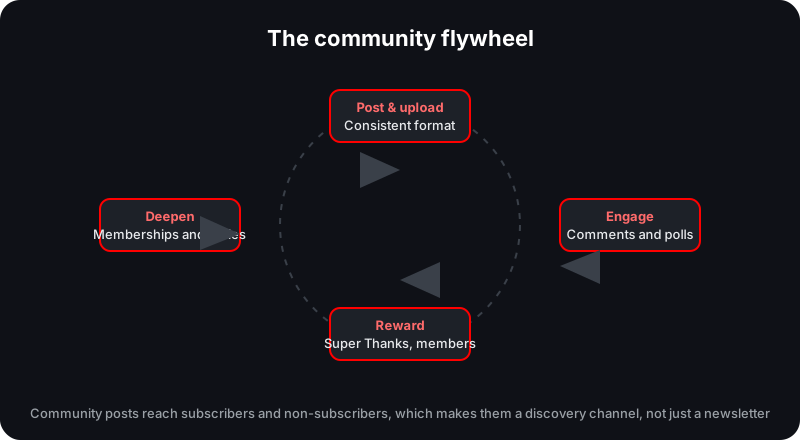
The community flywheel: each loop of posting, engaging, rewarding, and deepening feeds the next.
The Community Tab Is a Discovery Tool, Not a Newsletter
The Community tab is often treated as a feature for established channels, but it is available to much smaller ones. Enabling Advanced Features, which requires phone verification plus channel history or a valid ID, unlocks it, so you do not need to wait for the full monetization threshold to start posting. The more important detail is who sees your posts. Community posts reach both subscribers and non-subscribers, which makes the tab a genuine discovery channel rather than a private newsletter for people who already follow you. A well-timed post can put your channel in front of an audience that has never subscribed, which makes the tab one of the cheapest growth tools YouTube gives small channels. Because Advanced Features also lift daily upload and live-stream limits, unlocking them early pays for itself well beyond the Community tab itself.
What to Post
The best community posts give people a reason to react, not just something to read. A mix of formats keeps the tab from going stale and gives the algorithm steady engagement to measure. Consistency matters as much as the format: a channel that posts to the tab on a predictable rhythm trains its audience to check in between uploads, and a trained audience shows up faster when the next video drops.
Post type
What it does
Example
Poll
Gets opinions fast and feeds future content
"Which topic should the next video cover?"
Behind the scenes
Builds a personal connection
A photo of the setup or a failed take
Teaser
Drives anticipation for an upload
A thumbnail reveal or a short clip
Q&A
Surfaces what your audience actually asks
"Ask me anything in the comments"
Milestone
Lets the audience celebrate with you
"We hit 10,000 subscribers, thank you"
Community event
Creates a shared moment
A scheduled live Q&A or challenge
Memberships: Loyalty With Recurring Revenue
Channel memberships open at the early-access YouTube Partner Program tier, which starts at 500 subscribers. That means a channel can start offering paid memberships long before it reaches the 1,000-subscriber, 4,000-hour level where ads turn on, and our monetization requirements guide lays out both tiers side by side. Members make a recurring monthly payment in exchange for perks you control: badges next to their names, custom emoji, and members-only content and posts. The membership tier is where loyalty becomes a revenue line, and because the payment is recurring, it is one of the few forms of income that does not reset with each new upload. The early-access tier also includes Super Chat, Super Stickers, and Super Thanks, so a channel that starts building community at 500 subscribers can reward loyalty with several products at once, not just one.
Memberships and Super Thanks are built for different moments. Memberships are recurring commitments, ideal for your most loyal viewers. Super Thanks is a one-time tip on a specific video. Most channels run both: memberships for the inner circle, Super Thanks for spontaneous appreciation.
Super Thanks: Appreciation That Builds Habit
Super Thanks lets viewers pay to show appreciation on regular uploaded videos, and when the payout is acknowledged, it tends to encourage repeat support. Pin the buyer's comment, thank them on the Community tab, or give an in-video shoutout; public recognition makes the next tip more likely. The eligibility rules are worth knowing before you promise the feature. Super Thanks is not available on videos that are age-restricted, made for kids, unlisted or private, Content ID claimed, or tied to a fundraiser, and live streams and Premieres are not eligible either. Check each upload if a video carries any of those flags, and note that creators who acknowledge supporters on stream can use the Super Chat tools covered in our live streaming guide for the same effect in real time. When a feature is not available on a specific video, be transparent about it in the pinned comment or description; viewers who understand the rules are less likely to feel the channel let them down.
The First 48 Hours Are the Whole Window
The first 48 hours after upload are the critical engagement window. Likes, comments, and shares early on signal whether YouTube expands distribution, so the community you have built is not just a nice-to-have; it is a launch mechanism. A channel with a responsive audience can flood a new upload with early engagement, which tells the system the video is worth a wider test audience. That is the concrete payoff of posting regularly, answering comments, and running polls: your community becomes the fuel that moves each video from a small audience to a larger one. Community-driven channels also tend to retain viewers better, and retention compounds because session contribution has grown as a ranking signal. The same window is why a channel that ignores its comment section loses the compounding: unanswered engagement signals that the audience does not matter, and the next upload starts colder than it should.
The engagement flywheel
Post a consistent format so viewers know what to expect. Engage with every comment and poll answer. Reward supporters by reading names and pinning messages. Deepen the relationship with memberships and a recurring series. Each loop of the wheel produces the early engagement that buys the next upload a bigger audience, and bigger audiences produce more supporters to reward. The wheel only spins if every step happens on every upload, which is why routine beats inspiration for community building.
If you are not sure where to start, work through this checklist in order:
Enable Advanced Features so the Community tab unlocks before full monetization.
Post two or three times a week: a poll, a teaser, and a behind-the-scenes shot.
Reply to comments in the first 48 hours to feed the engagement window.
Acknowledge Super Thanks buyers by pinning their comment or shouting them out.
Open memberships once you hit the 500-subscriber early-access tier.
Use members-only posts and a recurring series to reward the inner circle.
Memberships, Super Thanks, and the community they create all feed the same flywheel. If you want the revenue numbers behind each fan-funding line, the memberships and affiliate revenue guide breaks them down by niche and tier.
See whether your community is actually growing
Use the Creator Dashboard to track engagement trends, upload rhythm, and subscriber growth across the weeks your community posts perform best.
Do I need 1,000 subscribers to use the Community tab?
No. Enabling Advanced Features, through phone verification plus channel history or a valid ID, unlocks the Community tab for smaller channels. You do not need to wait for the full monetization threshold.
Do community posts reach people who do not subscribe?
Yes. Community posts reach both subscribers and non-subscribers, which makes the tab a discovery channel rather than just a newsletter for existing fans.
What do channel memberships require in 2026?
Memberships open at the early-access YouTube Partner Program tier, which starts at 500 subscribers. Members pay recurring monthly amounts in exchange for perks like badges, emoji, and members-only content.
Which videos can use Super Thanks?
Super Thanks works on regular uploaded videos that are not age-restricted, made for kids, unlisted or private, Content ID claimed, or tied to a fundraiser. Live streams and Premieres are not eligible.
This guide synthesizes YouTube's official documentation and public reporting. Figures that vary by audience, region, or advertiser demand are estimates, not guarantees.
 Norlytics