Channel GrowthLast updated August 5, 2026 · 7 min read
YouTube Live Streaming in 2026: A Strategy for Growth and Monetization
Live streams create real-time engagement when it matters most, count toward monetization, and earn from more than ads. Here is the strategy that turns streaming into a growth habit, plus how the replay becomes a second product.
Live streaming feels like the opposite of everything YouTube is famous for: instead of a polished video that can be re-watched forever, you broadcast one unedited moment to whoever shows up. In 2026 that rawness is a feature. Live events create real-time engagement in the hours that matter most, feed the metrics YouTube cares about, and they monetize through more than just ads. This guide covers how live streams earn money, how they count toward monetization, and the repeatable strategy that turns streaming from an occasional experiment into a dependable growth engine.
Why Live Fits How YouTube Ranks Content
YouTube's browse and discovery systems reward channels that stay active, and regular uploads plus live streams count as active behavior. Live events also create engagement velocity, the burst of chat, likes, and Super Chats that arrives in the crucial first hours after a broadcast begins. That early spike tells YouTube a piece of content is being actively discussed, which supports wider distribution afterwards. Premieres borrow the same trick for scheduled uploads: the video is pre-recorded, but it airs as a shared moment with live chat, giving a regular upload the same event energy as a stream without the risk of dead air.
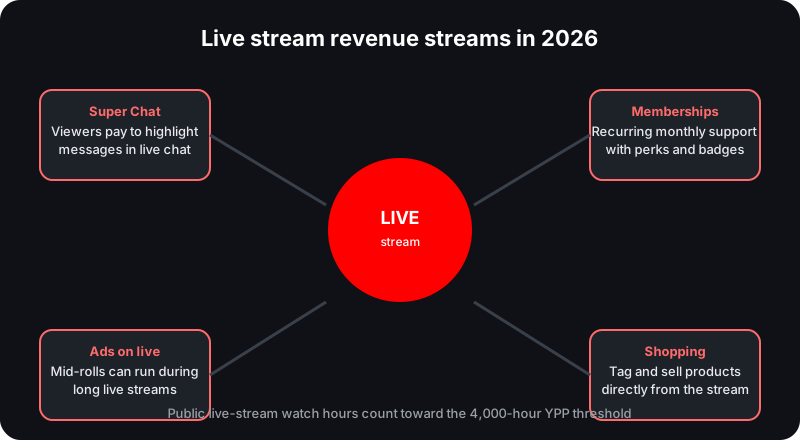
Four revenue streams can run on a single live broadcast, layered on top of each other.
The Four Live Revenue Streams
Once a channel is monetized, a live stream can earn from four different places at the same time. The table below shows how each one works.
Revenue stream
How it works
Eligibility notes
Super Chat & Super Stickers
Viewers pay to highlight a message or animated image in live chat
Requires the YouTube Partner Program and an eligible country
Channel memberships
Viewers join with recurring monthly payments
Perks like badges, emoji, and members-only content
Ads on live
Pre-roll and mid-roll ads run during the stream
Needs the Partner Program with ads enabled
YouTube Shopping
Products are tagged and bought during the broadcast
Depends on Shopping eligibility
Super Chat and Super Stickers
Super Chat and Super Stickers are the signature live-stream earners. Viewers pay to get their message highlighted or pinned in the live chat, and the paid messages are visible to everyone watching, which makes them both a revenue line and a public signal that the stream is worth being part of. Both features require the YouTube Partner Program and eligibility in an available country, and they are available on live streams and Premieres wherever live chat is turned on.
Memberships, ads, and Shopping
Channel memberships give viewers a recurring reason to stay connected between broadcasts, with monthly payments in exchange for badges, emoji, and members-only perks. Ads can run during the stream itself, which means a long broadcast monetizes for its whole duration rather than in a single pre-roll. YouTube Shopping rounds out the set: products tagged in the stream can be bought without leaving the broadcast. None of these require the stream to be a certain length; they simply layer on top of whatever you broadcast.
A well-run stream does not have to choose between these four. A viewer can join mid-broadcast, drop a Super Chat, watch the creator answer it on air, and end the session with a membership prompt before the next stream. The broadcasts that monetize most naturally do not interrupt the moment; they match the feature to what is already happening in the chat, and the mix changes with the audience's mood from one event to the next.
Super Thanks is a different product, and it does not apply here. Super Thanks is for regular uploaded videos and Shorts, not for live streams or active Premieres. If you want appreciation revenue during a live event, that is Super Chat and Super Stickers' job.
How Live Watch Hours Count Toward Monetization
Live streams have a direct path into the YouTube Partner Program. Public live-stream watch hours count fully toward the 4,000-hour threshold, and the same applies to the 3,000-hour figure at the early-access tier. That is a meaningful shortcut for channels that can fill a room. The catch is visibility: if you later set the replay to Unlisted or Private, those watch hours are removed. The counter only counts public watch time, so a hidden replay erases the progress it once represented. If you want a stream to count toward monetization, keep it public and plan around that from the start. See our monetization requirements guide for the full set of thresholds.
The replay is the second product
Keeping the replay public turns one live event into a lasting asset. The video on demand keeps earning watch time and search traffic after the live event ends, which means a stream that performed only so-so in the moment can still accumulate hours and rankings for months. Channels that hide their replays throw away that compounding. Treat the live event as the launch, not the finished product, and the replay as an ongoing asset that works while you sleep.
The Live Strategy That Compounds
Monetization and watch time only help if the stream is worth showing up for. The strategy that works in 2026 is deliberately boring: predictable, announced, and repeatable. Routine is what turns a broadcast into an appointment viewers keep.
Pick a recurring schedule and time zone, and stick to it so viewers form a habit.
Announce each stream in advance through the Community tab.
Prep three to five discussion points so you never stall on air.
Acknowledge Super Chats and members by name on air.
Keep the replay public so it keeps earning watch time and search traffic.
Clip highlights into Shorts afterward to feed discovery between broadcasts.
Timing matters more for live than for almost anything else, and our best time to post guide covers how to find the slot your audience actually shows up for. The community building guide explains how to turn the people who arrive into members and regulars rather than one-off viewers.
A sample weekly cadence
A 45-minute Q&A airs every Thursday at 7pm in the channel's main time zone. Tuesday's Community post announces the topic and takes poll votes. The host reads the three most-upvoted questions, answers them, then opens the floor. Super Chat names get read live. On Friday the replay stays public and two highlights become Shorts. Within a month the channel has a recognizable weekly event, a growing replay catalog, and a pipeline of clips.
Premieres: Live Energy for Scheduled Uploads
If full streaming feels like too much, Premieres are the middle ground. A premiere airs a finished video on a schedule with live chat, so a regular upload gets the shared event moment without requiring you to perform for an hour. It also inherits the monetization tools, Super Chat and Super Stickers included, wherever those are enabled. It is the easiest way to add live-format energy to a channel that still runs on polished uploads, and it produces a public replay by default, so the watch-time benefits carry over without any extra decision.
Turn your live schedule into a growth plan
Track upload patterns, watch-time growth, and engagement in the Creator Dashboard so you can see whether streaming is actually moving your channel.
Do live-stream watch hours count toward the 4,000-hour requirement?
Yes. Public live-stream watch hours count fully toward the 4,000-hour YouTube Partner Program threshold. If you later set the replay to Unlisted or Private, those hours are removed.
Can I earn money from live streams before monetization?
Not through the live monetization features. Super Chat and Super Stickers require the YouTube Partner Program and eligibility in an available country, and memberships, ads, and Shopping also depend on monetization.
Is Super Thanks available on live streams?
No. Super Thanks is for regular uploaded videos and Shorts. Live streams and active Premieres use Super Chat and Super Stickers instead.
Should I keep the replay public after a live stream?
Yes. A public replay keeps earning watch time and search traffic after the live event ends, and hiding it removes the watch hours it already earned.
This guide synthesizes YouTube's official documentation and public reporting. Figures that vary by audience, region, or advertiser demand are estimates, not guarantees.
 Norlytics