Content CreatorsLast updated August 5, 2026 · 8 min read
YouTube Podcasts in 2026: How to Turn Long-Form Audio Into a Growth Channel
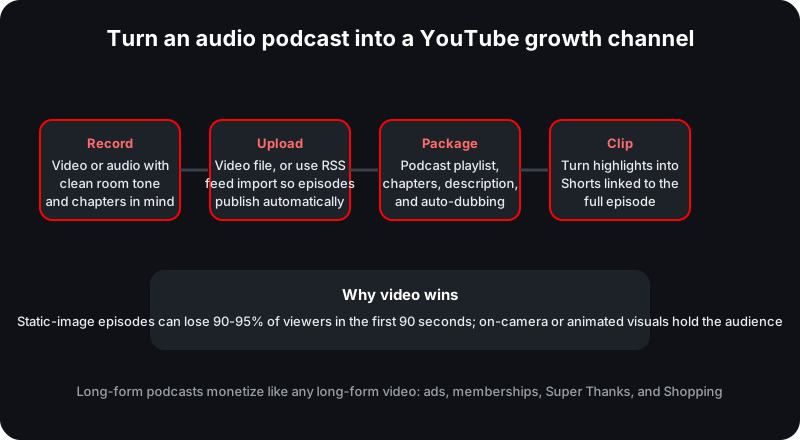
YouTube has become the default home for podcasts, and the audience is watching on the biggest screen in the house. Here is the pipeline that turns a one-hour audio recording into a channel that grows: record, upload, package, and clip.
Podcasts used to be an audio-first medium with YouTube as an afterthought. By 2026 the order has flipped. YouTube now reports more than one billion monthly podcast viewers, and long-form audio has become one of the most reliable ways to fill a channel with watchable content. For creators who already publish an audio feed, the question is no longer whether to upload to YouTube but how to turn the same recording into a video experience people actually finish. This guide walks through the pipeline that makes it work: record, upload, package, and clip.
Why Podcasts Landed on YouTube
YouTube claims more than one billion monthly podcast viewers. That figure counts anyone who watches even a second of podcast-designated content, autoplay included, so it is a reach metric rather than a measure of finished episodes. It is still a useful sign of how much demand the format has accumulated. The consumption pattern that matters most for creators is television: in 2025 YouTube viewers watched over 700 million hours of podcasts per month on TV screens in a single month, and the figure has since grown. An audience that listens on a TV is an audience that expects something to look at, which is exactly why video podcasts now consistently outperform audio-only uploads.
The podcast growth pipeline: each stage turns the same recording into a more valuable YouTube asset.
The Video Advantage Is Not Optional
Static-image episodes, a still cover with the audio playing underneath, are the easiest way to get a podcast onto YouTube, and the numbers suggest they are also the weakest. Viewers click play expecting visuals, and when the picture does not move, they leave. Reported behavior shows static-image episodes losing 90-95% of their audience within the first 90 seconds. The same content with actual visuals keeps a far larger share of that opening audience.
A well-documented example makes the gap concrete. A major public radio publisher averaged about 179 views per static-image episode, then jumped to roughly 3,000 views per episode once real studio footage was added to the identical audio, a reported 16x increase driven by packaging alone. The lesson is not that you must build a studio. It is that you must give the viewer something to look at that changes over time.
Format
What viewers see
Typical outcome
Static-image episode
A still cover with the same audio track
Reported ~179 average views; 90-95% leave within 90 seconds
Studio or hosted video
Faces, movement, or animated graphics
Reported ~3,000 average views for the same audio; far better early retention
RSS-imported episode
Your cover art until you add visuals
Convenient to publish, but treat as a starting point rather than the end state
If most of your audience finds you through search, chapters and transcripts matter just as much as the visuals. A podcast episode with real segments becomes dozens of searchable moments instead of one undifferentiated hour, and each of those moments can rank independently in results.
About that billion figure: YouTube counts anyone who watches even a second of podcast-designated content, including autoplay. It measures reach, not completion. Use it as a sign of demand, not as a promise about your own retention.
The Podcast Pipeline, Step by Step
The work is not in recording the audio; it is in what happens after. Four stages turn one recording into a growing channel asset.
Record
Record with video in mind even if the show starts audio-only. A fixed camera on the host or guest gives you footage to layer over the conversation, and it costs little compared with the retention it protects. If you record in pure audio, keep the files clean, because YouTube will build a video from them and you will want options in the packaging step.
Upload once with RSS import
The cheapest way in is RSS feed import. Paste your podcast RSS feed into YouTube Studio and YouTube creates video episodes from the audio using your cover art, auto-uploading new episodes whenever you publish to the feed. Episodes land in a podcast playlist that YouTube treats as a show, and subscribers are notified as new episodes go live. The trade-off is visual: RSS-generated videos are static-image by default, which brings back the 90-second drop-off problem. Use the import to establish the channel, then upgrade the visuals episode by episode as the show proves itself.
Package for retention
Packaging is where podcast uploads either win or die. Create a podcast playlist so episodes surface as a bingeable series, and add chapters to each episode, which create searchable segments viewers can jump between. Cards and end screens push listeners from one episode to the next, and a well-structured show competes for the living room audience on equal footing with the biggest networks. The audience that forms around a bingeable series is also the audience that fills your Community tab, which is covered in our community building guide.
Clip to feed discovery
The final stage turns one long episode into a stream of discovery assets. Video Clips in YouTube Studio is an AI-powered tool that extracts short, shareable clips from long episodes without manual editing, and Shorts-to-long-form linking lets you create a Short from a podcast highlight with a link that routes viewers to the full episode. A single hour-long recording can produce a half-dozen Shorts, each one a potential entry point into the full conversation, much like the replay assets covered in our live streaming guide.
The RSS-to-clips loop
A weekly audio show imports its feed on Monday, and episodes go up as public videos in a podcast playlist. On Tuesday the host adds chapters to the biggest moments. On Wednesday three highlights become Shorts, each linked to the full episode. Every week the same one-hour recording builds a searchable catalog, a bingeable playlist, and a stream of clip traffic at the same time.
No Camera? New Tools Fill the Gap
The biggest objection to a video-first podcast is the camera. In 2026 YouTube is closing that gap. Its Generate Video from Audio feature, rolling out through the year, turns an audio episode into animated visuals and waveforms without a camera or editor, giving RSS-imported shows a moving picture almost for free. Auto-dubbing supports 27 languages with expressive speech, preserving tone and energy rather than producing flat machine narration, and a lip-sync pilot is underway for creators who want their on-screen presence translated. None of these tools replace good content, but together they remove most of the production excuses for keeping a podcast audio-only on a video platform.
Monetize the Podcast Channel
Long-form podcasts monetize like any long-form video. Once your channel is in the YouTube Partner Program, podcast episodes earn through ads, channel memberships, Super Thanks, and Shopping, using the same mechanisms as every other video on the channel. Podcasts are long, and long watch times are what ad revenue rewards, which is one reason YouTube treats podcast content as a serious monetization format rather than a vanity project. If you are choosing between a podcast channel and some other format, the economics now look far closer than they did a few years ago.
Upload via RSS import or Studio, and confirm episodes land in a public podcast playlist.
Add a real description and chapters so segments are searchable.
Replace static cover art with footage or animated visuals if early retention is weak.
Create at least one Short from a highlight and link it to the full episode.
Use Video Clips to mine older episodes for fresh discovery assets.
Set up memberships and Super Thanks once your channel is monetized.
Find the podcast niche worth building in
Use Niche Insights to compare audience demand and channel benchmarks across podcast-friendly niches before you commit to a format.
Does YouTube really have one billion podcast viewers?
Yes. YouTube reports more than one billion monthly podcast viewers. The figure counts anyone who watches even a second of podcast-designated content, including autoplay, so treat it as a reach statistic rather than a completion metric.
Do I need a camera to put my podcast on YouTube?
No. RSS feed import creates episodes from your audio using your cover art, and the new Generate Video from Audio feature turns episodes into animated visuals without a camera or editor. That said, static-image episodes tend to lose 90-95% of their audience within the first 90 seconds.
How do I connect my podcast RSS feed to YouTube?
Paste your podcast's RSS feed URL into YouTube Studio. YouTube creates video episodes from the audio using your cover art and auto-uploads new episodes every time you publish to the feed.
Can podcasts make money on YouTube?
Yes. Once your channel is in the YouTube Partner Program, long-form podcasts monetize like any long-form video through ads, channel memberships, Super Thanks, and Shopping.
This guide synthesizes YouTube's official documentation and public reporting. Figures that vary by audience, region, or advertiser demand are estimates, not guarantees.
 Norlytics